

When patients visit a dental practice for a treatment, they aren’t just expecting quality clinical care. They also want to know what they’re paying for a dental treatment, and if it suits their budget planning.
A practice that fails to provide its patients with accurate estimates of treatment costs not only loses patient trust but also misses revenue opportunities.
But you can stay ahead if you submit a clear and complete predetermination of benefits to the payer. It helps you know the cost estimates on payer reimbursement and patient responsibilities, and you can provide patients with these estimates before the treatment.
As a result, patients can confidently proceed with the treatment, and you can maximize collections on time.
Want to know how to do so? This blog helps you with that.
Here, you’ll find tips to submit the request with expert dental billing services. So, let’s get started!
What is Predetermination of Benefits?
Predetermination of benefits is a request sent by the dental practices to the insurance companies before performing certain procedures.
Its purpose is to request the payer to review a proposed dental treatment with supporting documents and provide estimates of the costs that the payer covers.
It’s done mostly for high-cost procedures, like crowns, implants, orthodontics, and periodontal surgery. Most of these claims have a higher value than $500. Some companies may require predetermination for claims costing more than $300.
Does Predetermination of Benefits Guarantee Payment?
A predetermination estimate doesn’t guarantee payment, and payers clearly mention this. It just informs you if the payer pays for this service and the maximum amount the payer covers for it.
And this figure may change between predetermination and reimbursement. The predetermination response and final reimbursement may not be the same.
Reimbursement is only possible if the patient’s coverage is active at the time of treatment. If the patient changes their job, switches insurance plan, or the coverage plan exceeds the annual maximum between predetermination and treatment, the final reimbursement can be different from the predetermination.
How Does Predetermination of Benefits Improve Patient Experience?
Let’s imagine an insured patient visits your practice for a treatment and asks you about treatment estimates, and your front-end staff doesn’t provide accurate estimates, the patient may not visit again for a follow-up schedule.
It doesn’t just harm their oral health, but also slows down your revenue cycle.
But if you send a predetermination of benefits to the payer and receive a response, you can provide patients with treatment cost estimates. When you provide these estimates to the patients, make sure to:
- Explain the estimates in plain language. Don’t use insurance-related terms like “UCR” or “alternative benefit provision” without explaining to the patients what they mean.
- Show both the payer’s and the patient’s share of treatment costs side by side.
- Remind patients that this estimate doesn’t guarantee payment, and the final reimbursement may be different from it.
- Offer payment plan options for patients’ portions before the treatment, so patients can easily pay their costs if they’re unable to afford the treatment.
- Document your conversation with the patient’s record in your practice management system/software (PMS). It legally protects you if there is a future dispute.
Doing so makes patient billing and collections smooth for your practice.
Patients know what they’re paying and decide if they want to proceed, and you can also prevent revenue loss.
What are the Components of a Dental Predetermination of Benefits?
A dental predetermination of benefits includes the following:
Patient and Subscriber Information
Add the patient’s full legal name, as it appears in the insurance data. Also, make sure to include all the other details related to a patient, like their:
- Date of birth
- Subscriber ID
- Group number
- Primary subscriber if the patient is dependent
- Relationship to subscriber
- Insurance company’s name and mailing address
Provider and Practice Information
The payer expects you to provide complete details about who is treating the patient. They want you to provide details like:
- Treating dentist’s full legal name and provider NPI
- Practice name, address, phone, fax, and email
- Tax ID (EIN or SSN)
And if a specialist is treating a patient, you must also include the information, whether it’s an oral surgeon or a periodontist.
Proposed Treatment Details
List all the planned procedures using the correct CDT codes, tooth numbers, surfaces, and a very brief clinical description. Your details must also include the diagnosed condition, the need to treat the patient, and how the treatment is perfect for the condition.
Back it up with clinical notes, radiographs, and other related documents, so the payer can review it and update you if it covers the treatment and the amount it covers for a procedure.
Supporting Documents
Documents help the payer comprehensively review a proposed dental procedure and provide you with the right estimates for it.
While supporting documents may vary for each procedure and each payer may set its own requirements, some attachments are common for dental claims. The table below explains these documents and their use:
| Document | Required for | Notes |
|---|---|---|
| Bitewing or full-mouth X-rays | Restorations, crowns, periodontal | Must be dated within 12–24 months for most payers |
| Clinical notes or narrative | High-cost or complex procedures | Prepared by the treating dentist |
| Medical history | Dental or oral conditions linked to or affecting other parts of the body | Periodontal disease linked to the entire body |
| Periapical X-rays | Root canals, extractions | Taken to diagnose a dental condition |
| Periodontal charting | Periodontal procedures | 6-point probing is standard |
| Study models and photos | Orthodontics, implants | Digital or physical study models; file format may vary by payer |
What’s the Difference Between Predetermination and Preauthorization?
Dental practices often confuse predetermination with preauthorization. But these are not the same and have different meanings and purposes. So, let’s break it down.
First, the predetermination of benefits is a request sent to the payer to get an estimate of the total charges it covers for a dental procedure. It’s not mandatory. It’s just an option where a dental practice gets an estimate of what the payer pays. But the payer is not bound to pay the amount in predetermination. The final reimbursement depends on the performed procedure and submitted claim.
A preauthorization is sent to the payer to confirm if it reimburses for the procedure, and get the approval before submitting the claim. It’s mandatory for high-cost procedures like bridges, crowns, dentures, and implants. Payer manuals contain lists of procedures that require preauthorization. If you submit a claim without receiving prior approval for these procedures, the payer denies the claim. But if you get approval and then attach the preauthorization number, you fulfill the requirements for the claim.
What’s the Step-by-Step Process for a Predetermination of Benefits?
As we’ve discussed what a predetermination request is and what to include in it, now, we’ll discuss the complete process for submitting the request.
Verify Patient Coverage
Getting eligibility and benefits verification is the first step in the predetermination request. Check if a patient is eligible for the treatment. Look out for annual maximums, frequency limitations, waiting periods, and other benefits or exclusions for the planned procedure in the patient’s coverage plan.
Gather the Clinical Documentation
Collect all the documents that your payer may require for a predetermination of benefits. Attach the current clinical notes, periodontal charts, X-rays, or other documents that prove the patient’s dental condition and justify your treatment.
Create an Internal Predetermination Request Template
Before sending a predetermination of benefits, prepare an internal request template for your staff.
To do so, create fields in the predetermination request template so your staff knows how to submit the predetermination request to the payer.
It should be similar to the ADA Dental Claim Form or your payer’s own dental claim form (such as Aetna’s Dental Benefits Form), so your staff can correctly submit the official request.
A predetermination request template should include the following fields:
- Patient and subscriber information
- Insurance plan details
- Planned procedures with CDT codes, tooth numbers, surfaces, and fees
- Clinical notes or narratives
- List of supporting attachments (periodontal charts, X-rays, etc.)
- Checklist of all the attachments
You may create the template on paper or use your dental billing software to generate an automatic format. It can be a worksheet in Microsoft Excel or Google Sheets, or a fillable report, which is designed similarly to the claim form.
Below is a sample of a general predetermination request template. You can customize it according to the treatment plan:
Patient & Insurance Information
Planned Procedures
Procedure 1
- Tooth #: 14
- CDT Code: D2740
- Surface: MO
- Description: Porcelain Crown
- Fee: $900
- Notes / Clinical Details: Large decay
- Attachments: X-Ray, Photo
Procedure 2
- Tooth #: 19
- CDT Code: D4341
- Surface: Quadrant
- Description: Scaling and root planing
- Fee: $250
- Notes / Clinical Details: Perio pockets 5–6 mm
- Attachments: Perio Chart
Procedure 3
- Tooth #: 3
- CDT Code: D2392
- Surface: MO
- Description: Composite
- Fee: $150
- Notes / Clinical Details: Recurrent decay
- Attachments: X-Ray
Narrative / Remarks
Tooth #14 has a large decay; SRP indicated due to localized periodontitis in the LR quadrant. No previous coverage issues.
Attachments Checklist
- Bitewing X-rays
- Periapical X-rays
- Full Mouth Series
- Periodontal Charting
- Intraoral Photos
- Other Documentation
Attach the Predetermination Request Letter
While in most cases, you just need an ADA predetermination form dental claim, some complex procedures may need a request letter.
For example, the case is linked to a medical necessity, or you request the payer to cover a procedure that exceeds the plan’s limitations by proving that the treatment is crucial for the patient’s health.
So, here is a dental predetermination of benefits letter sample:
[Practice Name]
[Practice Address]
[City, State ZIP]
Phone: [Phone Number]
Fax: [Fax Number]
NPI: [NPI Number]
Tax ID: [EIN]
Date: 02/26/2026
To:
[Insurance Company Name]
Attn: Predetermination Department
[Insurance Address]
[City, State ZIP]
Re: Request for Predetermination of Benefits – Medical Necessity
Dear Predetermination Review Team,
I am submitting this request for a predetermination of benefits for the following proposed dental treatment, which is medically necessary based on the patient’s current clinical condition.
Proposed Treatment
- CDT Code: D2740 – Crown, porcelain/ceramic substrate
- Tooth #: #30
- Practice Fee: $1,325.00
Clinical Findings and Medical Necessity
Upon examination, the patient presents with:
- Fractured mesiobuccal cusp on tooth #30
- Recurrent caries beneath an existing large MOD amalgam restoration
- Loss of more than 50% of coronal tooth structure
- Sensitivity to biting pressure
Radiographic evidence reveals recurrent interproximal decay extending into dentin approaching the pulp chamber, with undermined cuspal support and radiolucency beneath the existing restoration.
The existing amalgam restoration was placed on 06/12/2021. Due to the extent of structural compromise and fracture, the tooth is no longer a candidate for a direct restoration. Placement of another filling would not provide adequate structural support and would likely result in further fracture.
A full-coverage porcelain/ceramic crown (D2740) is required to:
- Restore structural integrity
- Prevent further cuspal fracture
- Maintain proper occlusal function
- Avoid potential endodontic treatment or extraction
The proposed treatment is conservative in nature and represents the most predictable method to preserve the natural tooth.
Supporting Documentation Included
- Current periapical radiograph
- Bitewing radiograph
- Intraoral photographs
- Clinical chart notes
This procedure is medically necessary and not elective or cosmetic. We respectfully request a written predetermination outlining:
- Estimated covered benefit
- Deductible and coinsurance amounts
- Any applicable frequency limitations or alternative benefit provisions
- Patient’s estimated financial responsibility
Please contact our office if additional documentation is required.
Thank you for your prompt review.
Sincerely,
[Doctor’s Name], DDS/DMD
[Signature if mailing]
[Practice Name]
Submit the Predetermination of Benefits
In this step, you’ll learn how to request predetermination of benefits for dental claims.
While most dental payers use the ADA Claim Form, some, like Aetna, use their own form for dental claim submission and predetermination of benefits. So, check your payer’s requirements for the form they accept, and also see their guidelines for submitting a predetermination request.
Now, if your payer requires you to request predetermination via the ADA claim form, download its current version. The first field requires you to select the type of transaction.
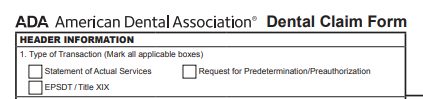
Tick the second checkbox in this one to confirm that you’re requesting a predetermination of benefits for the procedure.
And then, enter the planned procedures in the claim form according to your payer’s guidelines.
After that, submit the predetermination of benefits to the payer, just like you send a claim. You may submit it via an email address, manually through fax, or the payer portal.
Receive the Payer’s Response
After sending the request to the payer, confirm if it has received your request. When the payer confirms, it provides you with a predetermination number, which you can use to track the request and its status.
Meanwhile, the payer reviews your predetermination. It takes payers 15-30 business days to send a response, but dental practices that use payer portals may receive the information quickly by using the predetermination number to monitor it.
After reviewing your request, the payer applies the patient’s plan benefits to the applied procedure, providing an estimate for what it covers.
Plus, when the payer responds, here’s what to look for:
- Alternative benefit provision: It means that the payer may cover a procedure, but reimburse based on a less expensive alternative. For example, if you submit a pre-determination for a porcelain crown, the insurer may respond by informing you that it pays for the amount of a stainless steel crown.
- Partial approvals and missing procedures: If you submit five procedures and the payer responds to only three requests, it doesn’t mean the other two are covered. Confirm if the remaining procedures are pending review, require additional documentation, or are excluded under the patient’s plan. The partial approvals can also occur due to frequency limitation flags. For example, you request predetermination for a crown on a tooth. The plan allows it only once every 5 years, but the patient received the last crown 3 years ago.
Explain Treatment Estimates to Patients
After receiving the payer’s response, explain the treatment estimates to the patients. But, as we’ve mentioned earlier, tell them clearly that it’s not a guarantee of payment and not the final reimbursement. It’s updated in the dental EOB, which the payer sends after reimbursing a claim.
Why Do Payers Deny or Delay Response to Predetermination of Benefits?
While the predetermination estimate doesn’t confirm payment, payers may deny your request or delay their response.
It’s due to reasons like:
Administrative and Submission Errors
A payer may deny your request if it has the following errors:
- Incomplete ADA claim form fields (missing tooth number, surfaces, provider NPI, etc.)
- Incorrect patient information (name, DOB, subscriber ID)
- Missing coordination of benefits (COB) details if the payer is subscribed to two insurance plans
- No follow-up on pending requests
- Request submitted to the wrong payer or the wrong payer’s address
- Wrong or outdated CDT codes
These errors mainly occur because your system uses wrong and outdated details like patient records, payer details, and CDT codes.
You can prevent that by updating all these details in your PMS or billing software and tracking patient data. It helps you know if a patient is subscribed to a single plan or uses multiple insurance plans. If they use multiple plans, you can add COB details to it.
And implement ADA’s CDT code updates in your systems every January, so new codes are reflected, and you submit the latest codes for procedures in your predetermination request.
Benefit and Plan Limitations
Your predetermination request may be denied if the patient’s plan has issues like:
- Active waiting period
- Exhausted annual maximum
- Exceeded frequency limitation
- Missing tooth clause for procedures like bridges or implants
- Patient above the age limit for the treatment
- Treatment not covered under the patient’s plan
It happens when patients’ details aren’t verified upfront.
Use real-time eligibility verification to check plan benefits and limitations. It reduces your efforts and saves time spent on reviewing and correcting response denials. With verification, you know what the payer covers for a procedure and if the patient qualifies for it.
Clinical Review Denials
Payer denies the request if it deems the procedure isn’t medically necessary. Examples include:
- Crown requested when a filling is enough
- Scaling and root planing (SRP) requested without documented pocket depths
- Early replacement of restoration without damage or fracture to teeth
- Lack of evidence that supports a disease is progressing
It’s mainly when you don’t attach supporting documents like radiographs, images, and clinical narratives, and if you do, these don’t have enough details to justify a procedure, or the imaging quality for radiographs and intraoral photos is low or blurry.
Present a clear and concise clinical narrative that explains all details of a dental procedure, and set imaging standards for X-rays or photos. Before you attach these diagnostic or intraoral images to your request, make sure that their quality fulfills the standards.
How to Submit Predetermination of Benefits for Specific Dental Procedures?
Each dental procedure has its own requirements for predetermination of benefits. Documents required for a crown request may not work for an implant or an orthodontic case. And each payer can set its own requirements.
But here, we’ll discuss general documents required for the most common dental procedures.
Crowns and Bridges
When you submit predetermination of benefits for crowns and bridges, include a clinical narrative that explains why a simple filling isn’t enough for restoring or replacing a tooth. Payer needs evidence that proves dental conditions, such as:
- Caries damaging the tooth structure
- Fractured cusp
- Tooth having a large existing restoration with breakdown.
If you don’t provide the proper clinical justification, the payer may downgrade the reimbursement rate of a genuine crown claim to a filling.
So, to get the right estimate, always attach a periapical X-ray and a bitewing to your request. If the payer requires the X-ray to be taken within a certain time, like 6 to 12 months, make sure that it’s taken during that time.
Dental Implants
To submit a complete predetermination of benefits for dental implants, include documents like:
- CBCT scan reports
- Information about the missing tooth, like the date of extraction and the issue causing tooth loss
- Narrative explaining why an implant placement is needed
- Periapical X-rays
Some payers may also expect you to prove that you’ve tried to fix the issue via a low-cost alternative like a removable partial denture, but it hasn’t worked out for the condition.
Also, check your payer’s policy for implants. Coverage rules can be strict and vary for implants.
Periodontal Treatment
It’s mandatory to attach a complete periodontal charting with six-point probing for periodontal claims or predetermination requests. Most payers require a recent charting within the past 3 to 6 months.
Also, attach a strong clinical narrative, which explains and proves that the:
- Condition is severe
- Low-cost options like SRP have already been tried
- Surgery is required
And if the patient has other conditions, such as diabetes or cardiovascular disease that affect periodontal health, also include this information. It makes a strong argument for medical necessity.
Best Practices to Manage Dental Predetermination of Benefits at Your Practice
While your staff is busy managing the dental billing and coding process, it becomes difficult to review payer guidelines, submit a compliant predetermination of benefits, and track its progress with the payer.
Here are a few practical tips for managing, tracking, and reviewing dental predetermination of benefits with estimates.
Assign Responsibilities
Dedicate a member of your billing team to work on just the predetermination of benefits, instead of handling other tasks like:
- Verifying patient details
- Submitting claims
- Managing denied claims and appeals
This staff member should be responsible for all the predetermination tasks, like submissions, tracking, follow-ups, and communicating responses to the front desk and treatment coordinators.
Build a Payer Reference Guide
Create a single-page cheat sheet for each of your top payers, which covers their requirements for:
- Submitting the predetermination of benefits
- Sending the request to their address or via the payer portal
- Documents needed for each dental procedure
It should also include their average response time, so your staff can follow up with the payer if they don’t receive a response.
And update the cheat sheet if the payer policy rules change for predeterminations.
Prepare and Use Narrative Templates
Create draft narratives for common procedures that require predetermination, and use terms and explanations required by payers. For example, you can create a separate narrative template for Delta Dental and one for Aetna.
Your dentists can customize them for individual patients instead of creating new narratives each time. It cuts their average narrative writing time from 20 minutes to 5 minutes per case. These narratives align with payer expectations.
Review and approve each template at least once a year, so it complies with your payer guidelines.
Set Up Automated Tracking Reminders
Use your PMS to create automatic task reminders. If a payer’s average response time for predetermination is 15-30 days, set a reminder for the fifteenth day after submitting the request. With that, your system notifies you on the fifteenth day to check the response via the payer portal or contact the payer representative for follow-up.
Outsource the Process
You can effectively manage the predetermination of benefits by outsourcing dental billing to a company like TransDental.
When you work with a company that uses technologies like robotic process automation, processes become faster and more efficient. RPA works on pre-set rules and performs repetitive tasks very easily. And, it can be customized to your billing process.
It helps with:
- Verifying a patient’s insurance coverage, plan limits, waiting periods, and exclusions
- Confirming CDT codes are accurate for the patient’s treatment
- Ensuring ADA claim forms are complete for predetermination
- Cross-checking if narratives, periodontal charting, X-rays, or other documents are attached when required
- Submitting a predetermination request to the right payer portal or address
- Tracking pending requests and sending reminders
- Checking common predetermination denial reasons and fixing them before submission
- Providing analytics on predetermination approvals and denials to improve processes
While RPA requires expert supervision, it can easily handle multi-person tasks. This relieves your staff of time-consuming processes and reduces your overhead.
And the investment in this technology is cost-effective as compared to staff wages.
Plus, an expert billing company works with multiple payers and knows their policies very well, which it can use to send a payer-compliant predetermination of benefits.
Conclusion
Predetermination of benefits is important for improving your patient relationships.
If you submit the request by following payer guidelines, providing the right details with accurate CDT codes and required documents for a dental procedure, and follow up on it consistently, you’re likely to receive quick responses from the payer with accurate cost estimates for a treatment.
It streamlines your patient billing and communication and gives you a clear picture of what reimbursements you can expect from your payers, so you can recover payments from both ends and maintain a consistent cash flow for your practice.
Frequently Asked Questions (FAQs)
Is a predetermination the same as a guarantee of payment?
A predetermination is an estimate of benefits, not a guarantee. Insurance companies can still deny or adjust the final claim after treatment based on eligibility changes, coordination of benefits, or findings that differ from what was predeterminated.
How long does it take to get a predetermination response?
Response times vary by payer, but most insurers respond within 15 to 30 business days. If you use a payer portal, you may receive a quicker response, and check it using the tracking predetermination number.
What CDT codes most commonly require predetermination?
Crowns (D2710+), bridges (D6200+), implants (D6010+), full-arch prosthodontics (D5110+), periodontal surgery (D4210+), and orthodontic treatment (D8010+) are the procedure categories most frequently requiring predetermination. But make sure to check payer guidelines.
Can I use the ADA Dental Claim Form for predetermination requests?
The ADA Dental Claim Form is the standard accepted by most payers for a predetermination request. Fill it by checking Box 1 to indicate it is a “Request for Predetermination/Preauthorization” rather than a submitted claim.